Football Game T-Shirt Apparel Mockup JPG
Creating compelling visuals for your t-shirt designs doesn’t have to be expensive or time-consuming. With the Football Game T-Shirt Apparel Mockup JPG, you can easily showcase your artwork, text, or product in a realistic, sport-themed setting—without the hassle of setting up a real photo shoot.
What Is This Mockup?
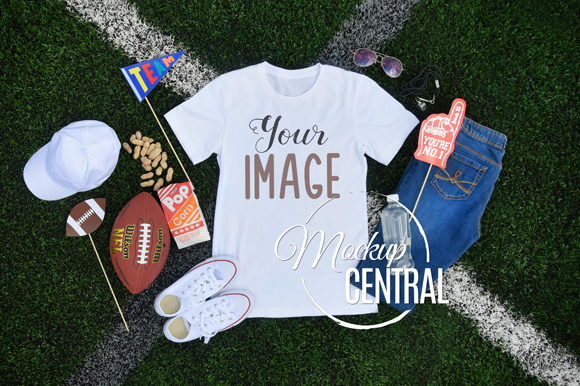
This mockup features a blank white t-shirt placed on a lush green football field, surrounded by sports props like a football, cleats, and goal posts. It's a flat lay, top-down JPG image with a resolution of 2400px x 3000px at 300 DPI. There are no layers, so you can simply open it in any design software that supports layers and place your design on top of the t-shirt area.
Why Use a Digital Mockup?
Whether you're a small business owner, graphic designer, blogger, or hobbyist, having high-quality visuals is key to standing out online. The Football Game T-Shirt Apparel Mockup JPG helps you:
- Save time and money by avoiding custom photo setups
- Showcase your designs in a natural, sporty context
- Present your ideas professionally to clients or customers
- Quickly test how your graphics look in real-world scenes
Where Can You Use It?
This mockup is perfect for a variety of digital and commercial uses. Here are a few practical examples:
- E-commerce product listings: Display your football-themed t-shirts with realistic visuals that attract buyers.
- Social media posts: Share lifestyle images that show your designs in action without needing a photoshoot.
- Portfolio presentations: Add dynamic visuals to your design portfolio that reflect your creativity and attention to detail.
- Marketing materials: Use the mockup in ads, banners, or email campaigns to communicate your brand’s style.
Who Benefits Most From This Mockup?
This tool is especially helpful for:
- Graphic designers who want to preview their work on a sporty backdrop
- Small business owners looking to build an online presence with minimal investment
- Content creators who need engaging visuals for blogs or social media
- Entrepreneurs launching a new line of sport-themed apparel
How to Use This Mockup Effectively
Since this is a flat JPG file without layers, you’ll need to use a program like Adobe Photoshop, GIMP, or similar to overlay your design onto the t-shirt. Here’s a simple way to get started:
- Open the mockup in your preferred design software
- Create a new layer above the t-shirt area
- Insert your artwork or text into that layer
- Resize and position it to fit the t-shirt naturally
- Flatten the image and save for use in your project
Important Considerations
Before using the Football Game T-Shirt Apparel Mockup JPG, keep these points in mind:
- Image quality: Always ensure your design is high resolution so it matches the clarity of the mockup.
- Design alignment: Pay attention to perspective and placement to make your design look natural.
- File format: You’ll receive a single JPG file zipped for download—no physical product is included.
- Customization limits: Since there are no layers, you can’t adjust the background or props—only the t-shirt graphic.
Real-World Use Cases
Here are a few ways people are using this type of mockup in real life:
- A freelance designer created mockups for a client launching a youth football camp apparel line.
- An online seller used the mockup to preview t-shirts with motivational sports quotes before printing.
- A blogger showcased a DIY football-themed shirt tutorial using the mockup instead of staging a full photo session.
- A startup used the image in an online ad campaign for a new line of fan gear.
Final Thoughts
The Football Game T-Shirt Apparel Mockup JPG is a versatile, budget-friendly tool that helps you bring your creative ideas to life. Whether you're designing for fun, profit, or personal projects, this mockup gives you a professional-looking result without the complexity or cost of real-world setups. Just add your design, and you’re ready to share, sell, or present with confidence.